

Monitor Changes on Selected Websites
Websites change over time. Prices move, availability shifts, listings get added or pulled, and page content gets updated. A monitoring project compares selected pages, fields, or website information across defined collection points to see what’s different.
The scope is set by the project: selected websites, defined pages, and the fields that matter to you, checked at the frequency your requirement calls for.
Request a Data Collection Project
What Website Change Monitoring Looks For
Where the information is publicly displayed and technically extractable, monitoring can look for changes such as:
- Price changes
- Availability changes
- Text or content changes
- Product or listing changes
- New items appearing
- Items being removed
- Changes to other selected fields
- Image or media changes, where supported
Which of these apply depends on what the source publishes and what the project defines as in scope.
Before-and-After Website Snapshots
At its core, the concept is simple:
- Earlier snapshot
- Compare selected data
- Identify changes
- Latest snapshot
The point isn’t the snapshot itself, it’s the difference between two of them. Each collection point becomes something to compare against the one before it.
What Can Be Compared
Price Changes
A previous price is compared against the current one for selected products or sources, so a change in price becomes visible between collection points.
Content Changes
Selected page text, headings, or other displayed content can be compared across snapshots to see what was edited, added, or removed.
Availability Changes
A product or listing’s availability status can be tracked between collection points, showing where something went in or out of stock, or was marked as unavailable.
Listing or Product Changes
New listings or products appearing, existing ones being removed, or selected fields changing on an existing listing can all be identified by comparing snapshots.
Monitoring Selected Pages and Fields
A monitoring project is scoped around specific pages, sections, or fields, rather than treating an entire website as one undifferentiated block to watch.
That scoping is what keeps the comparison meaningful. Selected pages and defined fields are checked against what was collected before, rather than the whole site being reviewed at once.
From Website Snapshots to Change Data
Comparing two snapshots produces a record of what changed. Depending on the project, that record can include:
- Previous value
- Current value
- Changed field
- Change status
- The collection point the change was found at
One-Time Comparison and Recurring Monitoring
One-Time Comparison
A single comparison between two points in time can be useful on its own. Common examples include:
- A website baseline snapshot
- A one-time change comparison
- A content snapshot
- A listing snapshot
- Website research
Recurring Monitoring
Where change over time matters more than a single comparison, the same collection and comparison process is repeated according to the schedule defined for the project, building up a history of what changed and when.
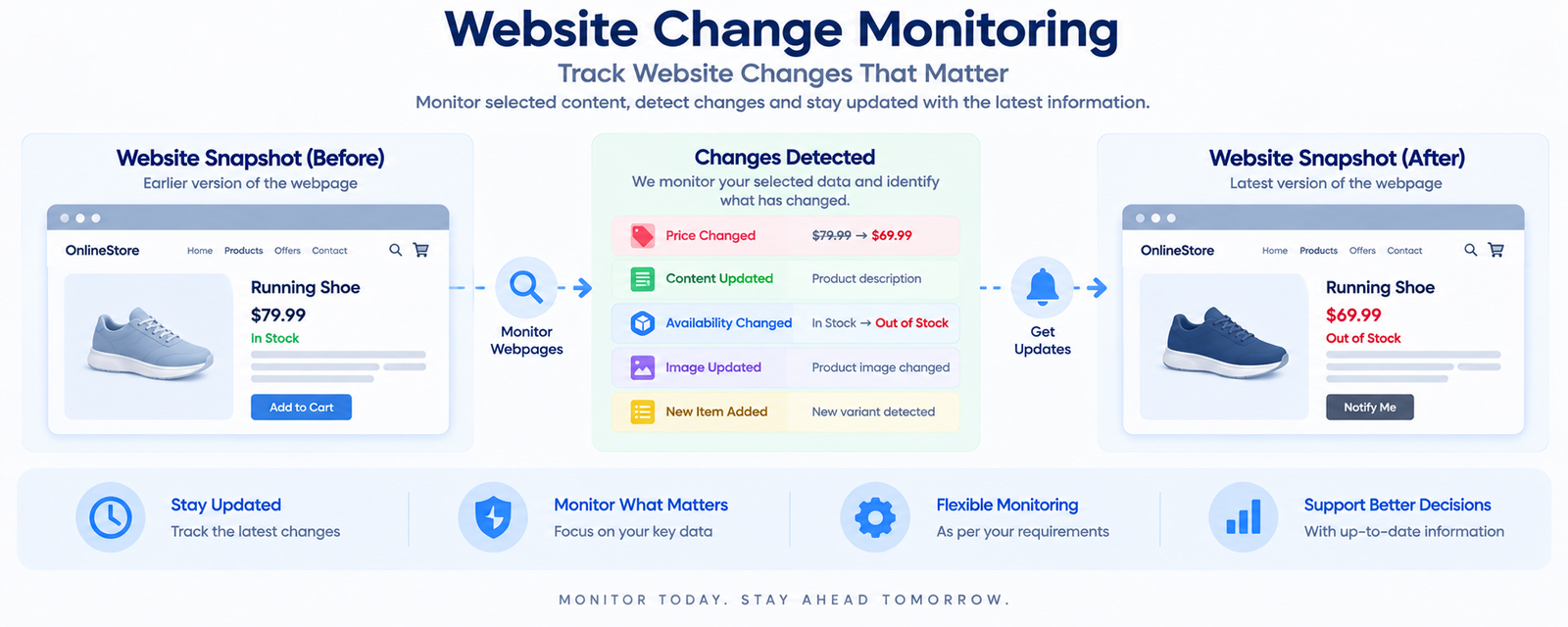
Before → Changes Detected → After
The diagram below shows the underlying idea: selected website information is compared between an earlier snapshot and a later one, and the differences between them are what get reported as changes.
When Website Change Monitoring Fits the Requirement
This approach tends to fit situations such as:
- Monitoring selected website information over time
- Comparing website versions from one point to another
- Identifying selected price or availability changes
- Tracking changes to listings or product information
- Maintaining historical comparison data
- Researching changes on defined pages
Where the requirement is simply the current price rather than what changed, price scraping or price monitoring is the more direct fit.
Define What You Want to Monitor
Before scoping the work, it helps to define:
- The websites or pages to monitor
- The fields or sections that matter
- The types of changes to look for
- Collection frequency, if the monitoring is recurring
- How changes should be compared
- The output required
Once these are defined, we can review the requirement and confirm an approach for the project.
Request a Data Collection Project