

Custom Crawling Around the Website Structure
Custom Web Crawling controls how a website is traversed — which starting points, categories, pagination and page paths a crawl follows — so that only the parts of a site relevant to the project are collected, within the boundaries the project defines.
The crawler is capable of following defined paths through a site to gather the necessary information for a project, rather than treating a website as one flat page to read.
Request a Data Collection Project
What Custom Web Crawling Controls
A custom crawl is defined around how it moves through a site, not just what it collects once it gets there. That can include:
- Starting URLs
- Internal link paths to follow
- Categories and subcategories
- Pagination
- Selected page types
- Full or partial site areas
- Pages or paths to include
- Pages or paths to exclude
- Crawl depth, defined according to project scope
Crawl the Parts of a Website That Matter
Not every project needs the whole website treated as one undifferentiated collection. Often only a specific part of the site is relevant: a category, a set of listing pages, or the pages a particular link path leads to.
A crawl can be scoped around:
- Selected categories
- Selected sections
- Listing pages
- Detail pages
- Linked content
- Specific site paths
- A defined set of websites or domains
The crawl only reaches what its defined paths lead it to — it doesn’t attempt to discover everything on a site by default.
Common Crawling Patterns
Link & Site Structure Crawling
The crawler follows defined relationships between pages, using a site’s own link structure to move from a starting page toward the pages that actually hold the required information.
Full or Partial Site Crawling
A crawl can be scoped to a defined website area, or extended across a broader part of the site’s structure, depending on what the project requires. Neither approach guarantees that every page on a site will be found; the crawl follows the paths and boundaries defined for it.
Deep Page Crawling
Some relevant pages sit several links away from a starting point. The crawl can be defined to follow paths deeper into a site’s structure where that’s where the required information actually lives, with crawl depth defined according to project scope rather than a fixed number.
Category & Pagination Crawling
Category structures, listing pages and pagination can all be part of the path a crawl follows on its way to the detail pages a project actually needs.
Multi-Website Crawling
Where a project needs comparable information from more than one site, defined crawl paths can be set up across several selected websites at once, each following its own structure toward the pages that matter.
When a Custom Crawl Is Useful
Traversal rules tend to matter most in situations like:
- Websites built around category and subcategory structures
- Sites where the relevant information sits several links away from the entry point
- Paginated listings that need to be worked through page by page
- Projects that need selected sections rather than an entire site
- Websites with different paths leading to similar content
- Projects where include/exclude boundaries need to be set in advance
- Multiple selected websites that share a comparable structure
From Crawl Paths to Structured Data
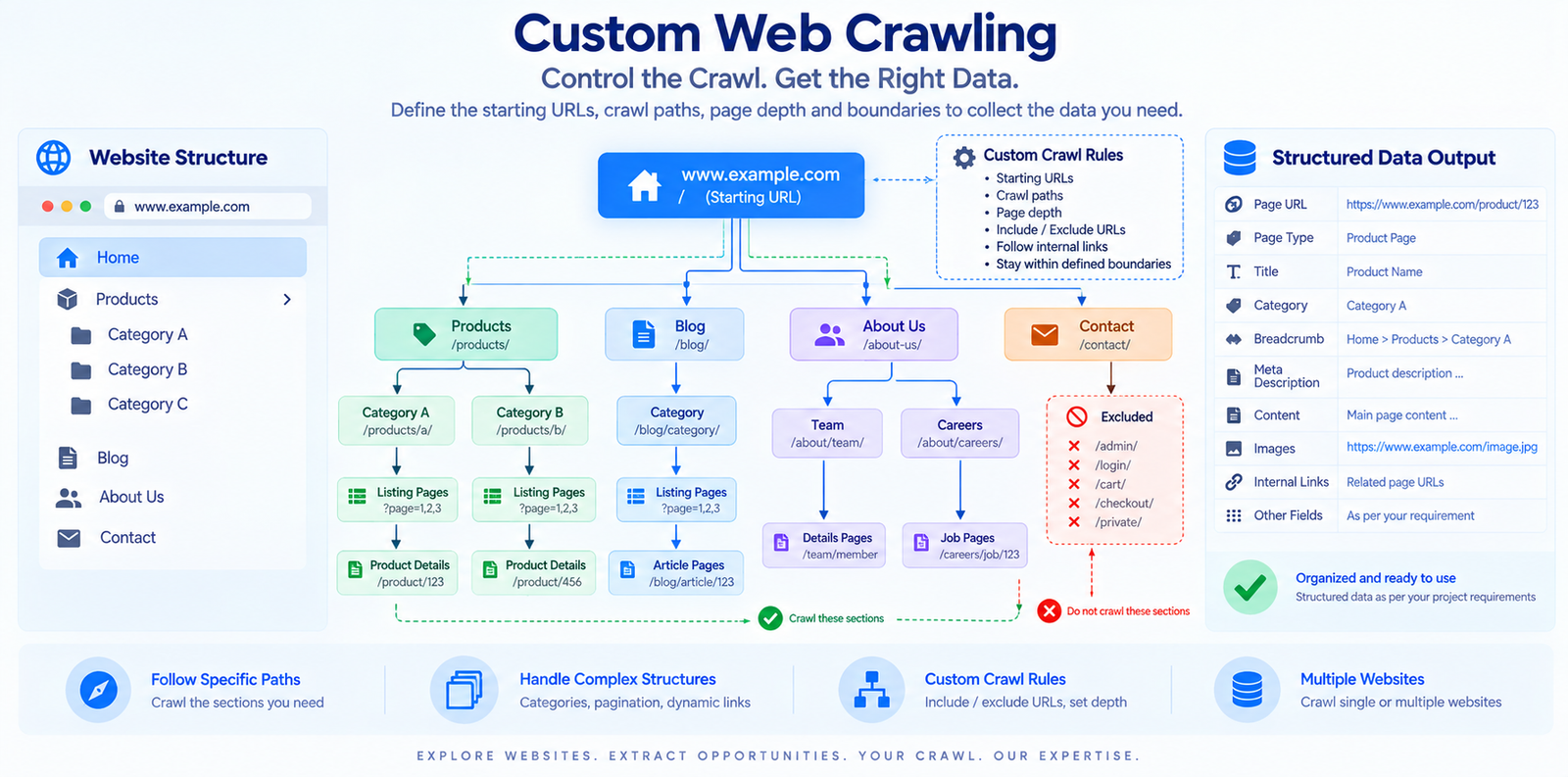
A defined starting point leads to a selected path, which leads to the relevant listing or category pages, then the detail pages, then the specific information required from them, and finally a structured dataset.
The crawl determines which pages get reached. What information is pulled from those pages once they’re reached is a separate, related question, defined by the fields the project needs.
Depending on the project, collected information can be delivered in formats such as CSV, Excel, JSON, a database, or another agreed format.
Define the Custom Crawl Requirements
Before a crawl is built, it helps to define:
- Starting URLs
- Website or domain scope
- Sections or categories to include
- Pages or paths to include
- Pages or paths to exclude
- Pagination requirements
- Desired crawl depth, defined according to project scope
- Information required from the pages reached
- Output requirements
Example Crawl Structure
The illustration below is an example of how a custom crawl can move from a starting URL through selected categories, listings and detail pages while staying within the crawl boundaries defined for the project. The paths and page examples shown are illustrative only.
When Custom Crawling Is Not the Main Requirement
Custom Web Crawling is primarily concerned with traversal: how a crawl moves through a site and which paths it follows.
Where the main requirement looks more like one of these, a different service approach may be a better fit:
- Broad website scraping as an overall collection service
- Extracting specific fields from a known set of pages
- Very large-volume data collection
- Recurring data delivery
- API-based delivery
Define the Crawl You Need
A crawl can be scoped around your website’s structure: the paths it should follow, the page types it should reach, and the information that should be collected once it gets there.
Request a Data Collection Project